


 Homepage
 Forum
Forum Drivers
 HMM-Manuals
 MTM
MTM Feed
Feed
I have my W530 set to use the Intel graphics card, which I was hoping would allow me to use my old 90 watt chargers, but apparently not... Is the only way to charge this with the 170 watt chargers? That's quite a beast to carry around...
And why is that? Is it all due to the CPU? I was hoping it was because of the Nvidia GPU (I have the i7-3740QM and K1000M, screen @1080p).
Edited to add: SOLVED! See this post down thread:
viewtopic.php?f=70&t=131940&p=854481#p854477
Take a look at our
ThinkPads.com HOME PAGE
For those who might want to contribute to the blog, start here: Editors Alley Topic
Then contact Bill with a Private Message
ThinkPads.com HOME PAGE
For those who might want to contribute to the blog, start here: Editors Alley Topic
Then contact Bill with a Private Message
Necessity of using the 170 watt charger? (SOLVED!)
Necessity of using the 170 watt charger? (SOLVED!)
Last edited by wrybread on Sat Jan 30, 2021 4:57 pm, edited 2 times in total.
-
moofish2842
- Posts: 35
- Joined: Tue Sep 17, 2019 2:57 pm
- Location: La Verkin, Utah
Re: Necessity of using the 170 watt charger?
I believe that it is based on machine design and not by CPU. I have a t530 that I upgraded from dual to quad core and it doesn't need the 135w charger, even though I believe factory quad cores required or at least shipped with them. My W541 has always needed 170W and that is one of the main reasons I upgraded to my X1 yoga along with battery life that couldn't stand for itself. The way these laptops tell what charger they have is a resistor in the tip of the charging connector, so if you were really sneaky you might be able to replace this resistor in a 90W charger to trick the W530 into using it. With the dGPU disabled and on win10 battery saving mode I would guess you could get away with it. I believe there are places that know what these resistor values are if you search for them.
W541 - i7-4940mx, 8gb RAM, Quadro k2100m
T530 - i7-3632qm, 8gb RAM, NVS 5400M; motherboard upgrade from t520.
T430 - i5-3320m, 4gb
T430s - i7-3520m, 8gb
Helix 1st Gen - i5-3337u 4gb
Other experience with X230t and t540p
I am 15 years old
T530 - i7-3632qm, 8gb RAM, NVS 5400M; motherboard upgrade from t520.
T430 - i5-3320m, 4gb
T430s - i7-3520m, 8gb
Helix 1st Gen - i5-3337u 4gb
Other experience with X230t and t540p
I am 15 years old
Re: Necessity of using the 170 watt charger?
That's interesting. If the resistor is in the tip I wonder if I could just splice the tip of a 170w charger onto a 90?
The W530 is already huge, which I'm ok with, I like the form factor, it's nice to use. But carrying around that giant power brick in addition is getting into deal breaker territory.
The W530 is already huge, which I'm ok with, I like the form factor, it's nice to use. But carrying around that giant power brick in addition is getting into deal breaker territory.

Re: Necessity of using the 170 watt charger?
It seems the risk is overloading the 90W charger: the machine will think it's Ok to pull way above 90W.
How big of a risk that would be is an interesting question.
Another interesting question is how good the protections inside the charger are, e.g. how it would react to overload: lower voltage? switch off? smoke and burn?
It might be interesting to measure how much your Thinkpad is actually drawing.
Does anybody know if this 170W is max which the charger draws from the wall socket or max that it supplies to Thinkpad?
One way to measure things up is by using a "measuring power socket extender" device, like the one I have at home. It plugs into a normal wall socket and has another socket on it. Obviously that'd measure how much we're drawing from the wall socket. Another way to measure is to cut that cable on 170Wt charger and plug a multimeter in between Thinkpad and 170Wt power brick. Of course you need the right kind of leads for the multimeter.
The whole idea of measuring is to establish how far out of its envelope would a 90Wt charger really be taken under various circumstances. I probably wouldn't settle on a "modified 90W" as a permanent solution without measuring this first.
P.S. What happens if you plug in a 90Wt charger? Does your W530 start? Do you end up draining your battery? Do you fail to charge? Can you charge with Thinkpad switched off?
X220, 2 *T520
Re: Necessity of using the 170 watt charger?
Interesting point about overloading the 90w charger. I'm thinking it should be possible to keep an eye and hand on the heat of the charger. And measuring actual wattage is a great idea too.
https://www.amazon.com/P3-P4400-Electri ... B00009MDBU
Edited to add:
- and if I shut down the laptop and remove the battery and connect a 90 watt charger, it behaves like there's no power. Won't turn on, no lights.
- and if I run the laptop on the 90 watt charger the battery is actively discharging. It's completely ignoring the charger.
- and if I reboot with the 90w charger connected I get a black screen before the OS loads that says "The connect AC adaptor has a lower wattage than the recommended model which was shipped with the system. To booth with the AC adapter, please connect the AC adapter that was shipped with the system. Press Esc to continue."
Like a Kill-a-Watt? Good idea, and I have one somewhere. Beats snipping the wires on my charger for a multimeter.One way to measure things up is by using a "measuring power socket extender" device
https://www.amazon.com/P3-P4400-Electri ... B00009MDBU
Under Win10 it showed a warning that the battery wasn't charging, and that it might be possible to charge with that adaptor by closing the laptop (sleep). Unfortunately I checked the "don't show this message again" box, so I won't know if I'm successfully fooling it in future unless I can figure out how to undo that. And then it kept my laptop in battery saving mode and didn't appear to be charging, and I think it was actually discharging. Ugh, but I'll do some more tests.What happens if you plug in a 90Wt charger?
Edited to add:
- and if I shut down the laptop and remove the battery and connect a 90 watt charger, it behaves like there's no power. Won't turn on, no lights.
- and if I run the laptop on the 90 watt charger the battery is actively discharging. It's completely ignoring the charger.
- and if I reboot with the 90w charger connected I get a black screen before the OS loads that says "The connect AC adaptor has a lower wattage than the recommended model which was shipped with the system. To booth with the AC adapter, please connect the AC adapter that was shipped with the system. Press Esc to continue."
-
moofish2842
- Posts: 35
- Joined: Tue Sep 17, 2019 2:57 pm
- Location: La Verkin, Utah
Re: Necessity of using the 170 watt charger?
I have found that any charger will charge my W541 when closed, even a 45w.
W541 - i7-4940mx, 8gb RAM, Quadro k2100m
T530 - i7-3632qm, 8gb RAM, NVS 5400M; motherboard upgrade from t520.
T430 - i5-3320m, 4gb
T430s - i7-3520m, 8gb
Helix 1st Gen - i5-3337u 4gb
Other experience with X230t and t540p
I am 15 years old
T530 - i7-3632qm, 8gb RAM, NVS 5400M; motherboard upgrade from t520.
T430 - i5-3320m, 4gb
T430s - i7-3520m, 8gb
Helix 1st Gen - i5-3337u 4gb
Other experience with X230t and t540p
I am 15 years old
Re: Necessity of using the 170 watt charger?
And on a sidenote, how do you like the X1 Yoga? Is there a model with a large (~15") screen?
I love the form factor of the T530/W530. Nice big screen, nice uncluttered keyboard that's in the center, and no numpad (I can't stand when they jam a numpad onto a laptop). And I love the touchpad. Some of the newer Thinkpads have touchpads that I absolutely hate.
The P50 would be a done deal for me if it didn't have a numpad. I haven't tried it's touchpad though. At least some of the models have physical buttons for the touchpad, which I consider a good sign:
https://www.ebay.com/itm/Lenovo-ThinkPa ... 4650980894
Does anyone know of any other large thinkpads that are similar to the T530/W530 form factor?
I love the form factor of the T530/W530. Nice big screen, nice uncluttered keyboard that's in the center, and no numpad (I can't stand when they jam a numpad onto a laptop). And I love the touchpad. Some of the newer Thinkpads have touchpads that I absolutely hate.
The P50 would be a done deal for me if it didn't have a numpad. I haven't tried it's touchpad though. At least some of the models have physical buttons for the touchpad, which I consider a good sign:
https://www.ebay.com/itm/Lenovo-ThinkPa ... 4650980894
Does anyone know of any other large thinkpads that are similar to the T530/W530 form factor?
Last edited by wrybread on Fri Jan 29, 2021 5:51 pm, edited 3 times in total.
Re: Necessity of using the 170 watt charger?
Good to know. Guessing no charging at all while you use the laptop though?I have found that any charger will charge my W541 when closed, even a 45w.
I can't imagine the laptop actually consumes more than 90 watts while it's in use without a battery attached, but I guess there's an easy way to find out, as @atagunov says. Unfortunately I can't find my kill-a-watt, might be time for a trip to the hardware store.
-
moofish2842
- Posts: 35
- Joined: Tue Sep 17, 2019 2:57 pm
- Location: La Verkin, Utah
Re: Necessity of using the 170 watt charger?
Indeed, it is only with the laptop closed, it gives the same message you get off I open it.
I am loving the X1 yoga. It is very thin and portable, and it really feels like they've packed in everything from bigger thinkpads. It gets great battery life and has a pleasing screen. The few issues I have are the obvious ones: The keyboard has less travel (but it still feels great after adjusting), it doesn't support multiple internal drives, and the overall strength while very well built is not the solid brick of the t530.
I believe the only 15" thinkpad without a numpad made since the w530 is the X1 Extreme. It is very recent and expensive though so that would be a pretty big jump.
I am loving the X1 yoga. It is very thin and portable, and it really feels like they've packed in everything from bigger thinkpads. It gets great battery life and has a pleasing screen. The few issues I have are the obvious ones: The keyboard has less travel (but it still feels great after adjusting), it doesn't support multiple internal drives, and the overall strength while very well built is not the solid brick of the t530.
I believe the only 15" thinkpad without a numpad made since the w530 is the X1 Extreme. It is very recent and expensive though so that would be a pretty big jump.
W541 - i7-4940mx, 8gb RAM, Quadro k2100m
T530 - i7-3632qm, 8gb RAM, NVS 5400M; motherboard upgrade from t520.
T430 - i5-3320m, 4gb
T430s - i7-3520m, 8gb
Helix 1st Gen - i5-3337u 4gb
Other experience with X230t and t540p
I am 15 years old
T530 - i7-3632qm, 8gb RAM, NVS 5400M; motherboard upgrade from t520.
T430 - i5-3320m, 4gb
T430s - i7-3520m, 8gb
Helix 1st Gen - i5-3337u 4gb
Other experience with X230t and t540p
I am 15 years old
Re: Necessity of using the 170 watt charger?
Thanks for that, the X1 Extreme looks really good.
And I see it uses a 135 watt power supply. That makes me wonder if it would be possible to take a power supply from that and splice on the tip from a W530 charger, since I'm guessing the X1 power supply is much smaller and lighter. Having one small light power supply for my W530 laptop bag would largely solve the issue.
I know lithium chargers for electric bikes are pretty standard for a given voltage. I wonder if these are any different from model to model.
And I see it uses a 135 watt power supply. That makes me wonder if it would be possible to take a power supply from that and splice on the tip from a W530 charger, since I'm guessing the X1 power supply is much smaller and lighter. Having one small light power supply for my W530 laptop bag would largely solve the issue.
I know lithium chargers for electric bikes are pretty standard for a given voltage. I wonder if these are any different from model to model.
Last edited by wrybread on Sat Jan 30, 2021 12:04 am, edited 1 time in total.
-
moofish2842
- Posts: 35
- Joined: Tue Sep 17, 2019 2:57 pm
- Location: La Verkin, Utah
Re: Necessity of using the 170 watt charger?
This reminds me of a time when I was trying to figure out the same issue with my W541. At the time I was looking at a solution and had seriously started to consider it. This person on reddit has made multiple posts over the years about expanding their t420s battery by pretty big amounts. I was thinking I could do the same thing and even messaged them a couple times in curiosity. I searched for the old posts but since I'm on mobile this one is all I found: https://i.redd.it/8kbdjvw0yn361.jpg
I doubt this is really all that useful (the batteries would take up as much space as a charger, although you wouldn't need a wall outlet), but I thought I would share it just in case.
I doubt this is really all that useful (the batteries would take up as much space as a charger, although you wouldn't need a wall outlet), but I thought I would share it just in case.
W541 - i7-4940mx, 8gb RAM, Quadro k2100m
T530 - i7-3632qm, 8gb RAM, NVS 5400M; motherboard upgrade from t520.
T430 - i5-3320m, 4gb
T430s - i7-3520m, 8gb
Helix 1st Gen - i5-3337u 4gb
Other experience with X230t and t540p
I am 15 years old
T530 - i7-3632qm, 8gb RAM, NVS 5400M; motherboard upgrade from t520.
T430 - i5-3320m, 4gb
T430s - i7-3520m, 8gb
Helix 1st Gen - i5-3337u 4gb
Other experience with X230t and t540p
I am 15 years old
Re: Necessity of using the 170 watt charger?
That's awesome. I use my laptop all day from multiple locations though, so definitely need a charger. But very very cool project.
And I wonder what utility he's using that shows him his battery's actual capacity in watt hours? That sure would be handy to know.
And I wonder what utility he's using that shows him his battery's actual capacity in watt hours? That sure would be handy to know.
-
moofish2842
- Posts: 35
- Joined: Tue Sep 17, 2019 2:57 pm
- Location: La Verkin, Utah
Re: Necessity of using the 170 watt charger?
One one of the older posts they had a 24+ hour battery life playing video with a bunch of cells that covered the entire bottom of the laptop. It was pretty ridiculous but I could see the point.
W541 - i7-4940mx, 8gb RAM, Quadro k2100m
T530 - i7-3632qm, 8gb RAM, NVS 5400M; motherboard upgrade from t520.
T430 - i5-3320m, 4gb
T430s - i7-3520m, 8gb
Helix 1st Gen - i5-3337u 4gb
Other experience with X230t and t540p
I am 15 years old
T530 - i7-3632qm, 8gb RAM, NVS 5400M; motherboard upgrade from t520.
T430 - i5-3320m, 4gb
T430s - i7-3520m, 8gb
Helix 1st Gen - i5-3337u 4gb
Other experience with X230t and t540p
I am 15 years old
Re: Necessity of using the 170 watt charger?
Ha! That's great.
Would be neat to use an XT60 jack or similar like they use on electric bikes to have the ability to attach an external battery pack...
I know the voltage on this is wrong but these battery packs can be made in any voltage, and a premade battery pack probably already exists in the correct voltage (which I think is 12v?)... So all that would be needed would be adding an XT60 plug (or whatever). Might even be able to parallel it with the existing battery pack.
https://www.aliexpress.com/item/4000015 ... 5176%23598
(The above is a random electric bike battery pack I found with an XT60 jack, not one I necessarily endorse)
Those packs are getting so cheap and have far more capacity (i.e. more and better 18650 battery cells) than laptop packs. It doesn't solve my issue since it's also bulky, but it solves lots of other interesting issues. Off grid power for days.
That pack has 480 watt hours versus the 128 watt hours of the pack the guy made... And it's hot swappable.
Would be neat to use an XT60 jack or similar like they use on electric bikes to have the ability to attach an external battery pack...
I know the voltage on this is wrong but these battery packs can be made in any voltage, and a premade battery pack probably already exists in the correct voltage (which I think is 12v?)... So all that would be needed would be adding an XT60 plug (or whatever). Might even be able to parallel it with the existing battery pack.
https://www.aliexpress.com/item/4000015 ... 5176%23598
(The above is a random electric bike battery pack I found with an XT60 jack, not one I necessarily endorse)
Those packs are getting so cheap and have far more capacity (i.e. more and better 18650 battery cells) than laptop packs. It doesn't solve my issue since it's also bulky, but it solves lots of other interesting issues. Off grid power for days.
That pack has 480 watt hours versus the 128 watt hours of the pack the guy made... And it's hot swappable.
Last edited by wrybread on Sat Jan 30, 2021 5:04 pm, edited 1 time in total.
Re: Necessity of using the 170 watt charger?
Here's an interesting thread about the resistor in the power plug that tells the W530 which wattage charger is attached:
http://forum.notebookreview.com/threads ... es.681124/
Does seem like a fairly easy mod.
Edited to add another thread about it:
https://superuser.com/questions/1066018 ... nkpad-w530
That thread also has a method of modifying the motherboard so it will accept any charger (and treats every charger as a 135w). Hmm.
It also links to a post that says using the 90 watt charger works fine with the W530 for everything except very heavy loads, but unfortunately the post that gives more details is down. Good ol Lenovo forum. Needing to connect to the proper charger when rendering video seems reasonable enough. I'll probably start by modifying a 90 watt charger, and maybe do the mobo mod later. But phew, I see light at the end of the tunnel.
http://forum.notebookreview.com/threads ... es.681124/
Does seem like a fairly easy mod.
Edited to add another thread about it:
https://superuser.com/questions/1066018 ... nkpad-w530
That thread also has a method of modifying the motherboard so it will accept any charger (and treats every charger as a 135w). Hmm.
It also links to a post that says using the 90 watt charger works fine with the W530 for everything except very heavy loads, but unfortunately the post that gives more details is down. Good ol Lenovo forum. Needing to connect to the proper charger when rendering video seems reasonable enough. I'll probably start by modifying a 90 watt charger, and maybe do the mobo mod later. But phew, I see light at the end of the tunnel.
Last edited by wrybread on Sat Jan 30, 2021 5:06 pm, edited 1 time in total.
-
moofish2842
- Posts: 35
- Joined: Tue Sep 17, 2019 2:57 pm
- Location: La Verkin, Utah
Re: Necessity of using the 170 watt charger?
Another thing would be USB-PD. If you could get 90W to work, there are adapters you can get cheaply online to negotiate the right voltage with a USB power delivery source such as a 90 watt brick or battery bank. However, I have only seemed to find them for the square tip charger and I can't find adapters to the round tip either. That and I don't know what the PD adapters have as far as internal resistance to signal what they provide.
There have been many people who mod their X230 and T430 laptops with USB-C ports for charging in the first place although that would be a concern here as you would lose access to 170w charging altogether.
I wonder if you could get away with permanently installing a resistor between wires inside the laptop? I know there is a generous amount of room to work around the wires inside the case but you would have to figure out which one is which.
There have been many people who mod their X230 and T430 laptops with USB-C ports for charging in the first place although that would be a concern here as you would lose access to 170w charging altogether.
I wonder if you could get away with permanently installing a resistor between wires inside the laptop? I know there is a generous amount of room to work around the wires inside the case but you would have to figure out which one is which.
W541 - i7-4940mx, 8gb RAM, Quadro k2100m
T530 - i7-3632qm, 8gb RAM, NVS 5400M; motherboard upgrade from t520.
T430 - i5-3320m, 4gb
T430s - i7-3520m, 8gb
Helix 1st Gen - i5-3337u 4gb
Other experience with X230t and t540p
I am 15 years old
T530 - i7-3632qm, 8gb RAM, NVS 5400M; motherboard upgrade from t520.
T430 - i5-3320m, 4gb
T430s - i7-3520m, 8gb
Helix 1st Gen - i5-3337u 4gb
Other experience with X230t and t540p
I am 15 years old
Re: Necessity of using the 170 watt charger?
Ding ding ding! Well done. I was probably editing my last post to say that was possible just as you were writing that. See the superuser.com link I added, that has a mod to the mobo that does exactly what you said. I read it quickly, but I think all it's doing is shorting the middle pin of the charger to ground, on the mobo. And then the laptop thinks every charger is the 135 watt. And just use a jumper or even a switch and it's easily reversible.I wonder if you could get away with permanently installing a resistor between wires inside the laptop?
-
moofish2842
- Posts: 35
- Joined: Tue Sep 17, 2019 2:57 pm
- Location: La Verkin, Utah
Re: Necessity of using the 170 watt charger?
It looks like they made a mistake in that thread, as I seem to be understanding that 10k ohms is 65w, no connection is 90w, 170w is 1.5k ohms, and according to the second thread, a short to the pin is 135w. Thus jumping the ground to the sensor pin would make it think it's 135w no matter what, and connecting the two with a 1.5k ohm resistor would make it think 170w for every charger except a 135w. I am excited by this and if I can verify it's the same for square tip I may make this mod for my W541.
W541 - i7-4940mx, 8gb RAM, Quadro k2100m
T530 - i7-3632qm, 8gb RAM, NVS 5400M; motherboard upgrade from t520.
T430 - i5-3320m, 4gb
T430s - i7-3520m, 8gb
Helix 1st Gen - i5-3337u 4gb
Other experience with X230t and t540p
I am 15 years old
T530 - i7-3632qm, 8gb RAM, NVS 5400M; motherboard upgrade from t520.
T430 - i5-3320m, 4gb
T430s - i7-3520m, 8gb
Helix 1st Gen - i5-3337u 4gb
Other experience with X230t and t540p
I am 15 years old
Re: Necessity of using the 170 watt charger?
Good point, might as well use a 1.5k resistor instead of a jumper. But maybe then the additional resistance from the resistor in the plug would confuse it?
I'll measure the resistance between the center pin and ground of the various thinkpad chargers I have tomorrow to confirm all the numbers.
I'll measure the resistance between the center pin and ground of the various thinkpad chargers I have tomorrow to confirm all the numbers.
Last edited by wrybread on Sat Jan 30, 2021 5:08 pm, edited 1 time in total.
Re: Necessity of using the 170 watt charger?
Although I wonder what the laptop does differently with each charger, other than blocking certain chargers. If it does treat the chargers differently, maybe having it think the 90w is a 135w is better than it thinking it's a 170w.
-
moofish2842
- Posts: 35
- Joined: Tue Sep 17, 2019 2:57 pm
- Location: La Verkin, Utah
Re: Necessity of using the 170 watt charger?
I guess as long as it will accept 135w that is probably better. My concern was that it doesn't but I've never had one to test.
W541 - i7-4940mx, 8gb RAM, Quadro k2100m
T530 - i7-3632qm, 8gb RAM, NVS 5400M; motherboard upgrade from t520.
T430 - i5-3320m, 4gb
T430s - i7-3520m, 8gb
Helix 1st Gen - i5-3337u 4gb
Other experience with X230t and t540p
I am 15 years old
T530 - i7-3632qm, 8gb RAM, NVS 5400M; motherboard upgrade from t520.
T430 - i5-3320m, 4gb
T430s - i7-3520m, 8gb
Helix 1st Gen - i5-3337u 4gb
Other experience with X230t and t540p
I am 15 years old
Re: Necessity of using the 170 watt charger?
Good point. I assume the W530 works with a 135w charger, otherwise there wouldn't be much point of those folks posting the mod.
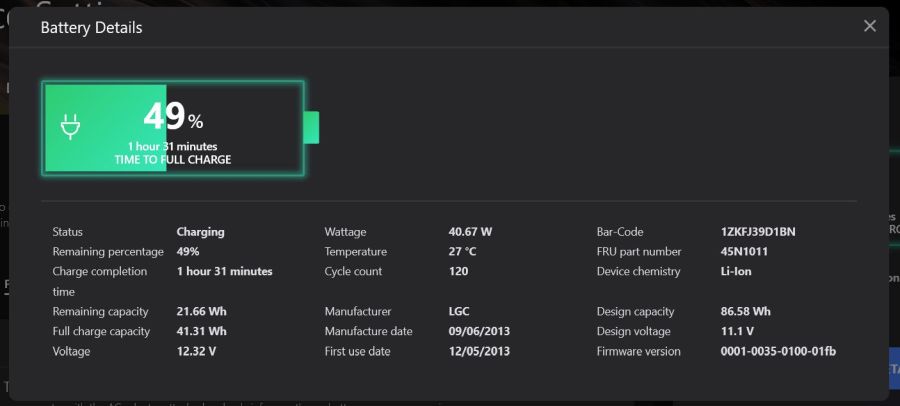
Do you have any idea what software made this screenshot (below the battery)? That shows which charger the laptop thinks is connected, would be useful to confirm the mod is working (as well as for measuring my battery's capacity):
https://i.redd.it/8kbdjvw0yn361.jpg
Do you have any idea what software made this screenshot (below the battery)? That shows which charger the laptop thinks is connected, would be useful to confirm the mod is working (as well as for measuring my battery's capacity):
https://i.redd.it/8kbdjvw0yn361.jpg
Last edited by wrybread on Sat Jan 30, 2021 5:09 pm, edited 2 times in total.
-
moofish2842
- Posts: 35
- Joined: Tue Sep 17, 2019 2:57 pm
- Location: La Verkin, Utah
Re: Necessity of using the 170 watt charger?
That's Lenovo Vantage. It gives you a few settings for the laptop and it can tell you about your battery. It also keeps all drivers updated from one place. You can download it from the Microsoft store on windows 10. Be warned it is a bit slow and promotes other Lenovo products. There is a way to install an older version through enterprise software is you're interested.
W541 - i7-4940mx, 8gb RAM, Quadro k2100m
T530 - i7-3632qm, 8gb RAM, NVS 5400M; motherboard upgrade from t520.
T430 - i5-3320m, 4gb
T430s - i7-3520m, 8gb
Helix 1st Gen - i5-3337u 4gb
Other experience with X230t and t540p
I am 15 years old
T530 - i7-3632qm, 8gb RAM, NVS 5400M; motherboard upgrade from t520.
T430 - i5-3320m, 4gb
T430s - i7-3520m, 8gb
Helix 1st Gen - i5-3337u 4gb
Other experience with X230t and t540p
I am 15 years old
Re: Necessity of using the 170 watt charger? (SOLVED!!!)
I just did the mod directly at the mobo and it works! I can boot with a 90 watt charger connected, and the battery is charging just fine while using Windows. So far the charger isn't getting unusually warm but obviously I'll be keeping a very close eye on that.
Commercial Vantage (thanks!) reports that a 135w charger is connected. Interestingly it also reports that it's consuming about 40 watts, which is the same wattage it was reporting before I did the mod with the 170w. I haven't tested under very many conditions yet.
http://sinkingsensation.com/stuff/charger_mod2.jpg
(And wow, I really need to replace my battery).
The mod is dead simple:
- PROCEED AT YOUR OWN RISK! AND BE VERY CAREFUL! This is all very experimental and provided for information purposes only, with the warning that YOU SHOULDN'T DO THIS MOD! Unless you decide you're comfortable with the risks, but you're on your own if you do. I REPEAT: YOU'RE ON YOUR OWN! If you do the mod I recommend going very slowly and carefully and with plenty of light and maybe a magnifying glass.
- remove the laptop from power and remove the battery
- remove the keyboard
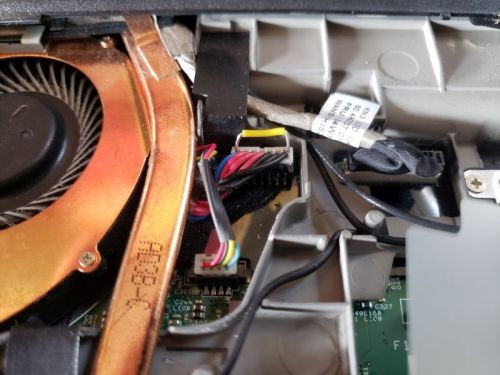
- look for the wire harness at top left and insert a jumper connecting the blue wire (which connects to the middle pin on the charger plug) and either of the black wires (ground). I didn't use solder, with a little finesse the jumper fits right into the wire harness and there's lots of friction holding it in place. I added electrical tape and some kapton tape to hold things down, since I'd like the ability to remove it for testing, but eventually I'll seal it up with hot glue.
- as you can see in the pic my jumper (the yellow wire) is too long and has naked wire exposed. It would be neater and safer if I trimmed the jumper wire first.
http://sinkingsensation.com/stuff/charger_mod.jpg
More pics and details here (from someone else doing the mod):
https://superuser.com/questions/1066018 ... nkpad-w530
To do:
- measure the power consumed at the wall with both the 170w and 90w charger, with and without the mod. Need to find my kill-a-watt
- keep a close eye on the heat from the charger!
- spend a lot of time watching the Commercial Vantage window. Incidentally "Commercial Vantage" is easily installed from the Windows Store. In one of the threads I read about it someone said you need to turn off updates in the Windows Store or it'll update to the version that shows ads, but unconfirmed.
- let me know if anyone can think of any other tests I should be doing or that would be useful.
My theory is that there's probably some use conditions that would overwhelm the 90w charger, and if Lenovo sells a million of these they're better off protecting themselves with a ginormous charger. But I'm hoping with a little attention my W530 will lead a long happy life with my 90w charger, and I'm no longer tempted to sell it on eBay and go back to a T530. Phew. Thanks so much to everyone who helped especially moonfish.
I'll try to keep this thread updated with how it goes over time, but if you're reading this long after I posted it and curious to know how it's going, post or email me (my username at gmail).
And @dr_st: I just shrunk the images fyi
Commercial Vantage (thanks!) reports that a 135w charger is connected. Interestingly it also reports that it's consuming about 40 watts, which is the same wattage it was reporting before I did the mod with the 170w. I haven't tested under very many conditions yet.
http://sinkingsensation.com/stuff/charger_mod2.jpg
(And wow, I really need to replace my battery).
The mod is dead simple:
- PROCEED AT YOUR OWN RISK! AND BE VERY CAREFUL! This is all very experimental and provided for information purposes only, with the warning that YOU SHOULDN'T DO THIS MOD! Unless you decide you're comfortable with the risks, but you're on your own if you do. I REPEAT: YOU'RE ON YOUR OWN! If you do the mod I recommend going very slowly and carefully and with plenty of light and maybe a magnifying glass.
- remove the laptop from power and remove the battery
- remove the keyboard
- look for the wire harness at top left and insert a jumper connecting the blue wire (which connects to the middle pin on the charger plug) and either of the black wires (ground). I didn't use solder, with a little finesse the jumper fits right into the wire harness and there's lots of friction holding it in place. I added electrical tape and some kapton tape to hold things down, since I'd like the ability to remove it for testing, but eventually I'll seal it up with hot glue.
- as you can see in the pic my jumper (the yellow wire) is too long and has naked wire exposed. It would be neater and safer if I trimmed the jumper wire first.
http://sinkingsensation.com/stuff/charger_mod.jpg
More pics and details here (from someone else doing the mod):
https://superuser.com/questions/1066018 ... nkpad-w530
To do:
- measure the power consumed at the wall with both the 170w and 90w charger, with and without the mod. Need to find my kill-a-watt
- keep a close eye on the heat from the charger!
- spend a lot of time watching the Commercial Vantage window. Incidentally "Commercial Vantage" is easily installed from the Windows Store. In one of the threads I read about it someone said you need to turn off updates in the Windows Store or it'll update to the version that shows ads, but unconfirmed.
- let me know if anyone can think of any other tests I should be doing or that would be useful.
My theory is that there's probably some use conditions that would overwhelm the 90w charger, and if Lenovo sells a million of these they're better off protecting themselves with a ginormous charger. But I'm hoping with a little attention my W530 will lead a long happy life with my 90w charger, and I'm no longer tempted to sell it on eBay and go back to a T530. Phew. Thanks so much to everyone who helped especially moonfish.
I'll try to keep this thread updated with how it goes over time, but if you're reading this long after I posted it and curious to know how it's going, post or email me (my username at gmail).
And @dr_st: I just shrunk the images fyi
Last edited by wrybread on Sat Jan 30, 2021 5:14 pm, edited 3 times in total.
-
moofish2842
- Posts: 35
- Joined: Tue Sep 17, 2019 2:57 pm
- Location: La Verkin, Utah
Re: Necessity of using the 170 watt charger? (SOLVED!)
Congrats! I'm glad I could put some of my research to use. I actually just thought of something, I wonder if this also fools the laptop when it's using a dock? If it does that might not be much use anyway because the dock may as well have a big charger, but if it doesn't then that might be a good thing so that you could have a permanent mod and still have it know it's on 170w in the dock. Given the nature of the dock pretty much being copies of the pins in the ports,I would guess it's still fooled. I may do this to my W541 if I get time and then I could check.
W541 - i7-4940mx, 8gb RAM, Quadro k2100m
T530 - i7-3632qm, 8gb RAM, NVS 5400M; motherboard upgrade from t520.
T430 - i5-3320m, 4gb
T430s - i7-3520m, 8gb
Helix 1st Gen - i5-3337u 4gb
Other experience with X230t and t540p
I am 15 years old
T530 - i7-3632qm, 8gb RAM, NVS 5400M; motherboard upgrade from t520.
T430 - i5-3320m, 4gb
T430s - i7-3520m, 8gb
Helix 1st Gen - i5-3337u 4gb
Other experience with X230t and t540p
I am 15 years old
Re: Necessity of using the 170 watt charger? (SOLVED!)
I bet it'll always think it's using a 135w charger even when using a dock with the 170w. Not a biggie for me since I never use a dock, although I do have one somewhere. But a few thoughts:
- it remains to be seen, by me at least, whether the laptop does anything different when a 135w versus a 170w charger is connected. I charge a lot of ebike battery packs and have different chargers for them, of varying wattages, and if I understand them correctly the battery brain (BMS) doesn't throttle charging depending on the charger, it just pulls as much as it can from the given charger.
- if someone is worried about it they could conceivably use a switch instead of a jumper. Could be something janky coming out the side, or with a little finesse might be able to use the wifi switch on the side and then just turn wifi off manually when needed.
- or of course just do the mod at the charger level, modifying individual 90w chargers. There's deets at that link at superuser.com.
- it remains to be seen, by me at least, whether the laptop does anything different when a 135w versus a 170w charger is connected. I charge a lot of ebike battery packs and have different chargers for them, of varying wattages, and if I understand them correctly the battery brain (BMS) doesn't throttle charging depending on the charger, it just pulls as much as it can from the given charger.
- if someone is worried about it they could conceivably use a switch instead of a jumper. Could be something janky coming out the side, or with a little finesse might be able to use the wifi switch on the side and then just turn wifi off manually when needed.
- or of course just do the mod at the charger level, modifying individual 90w chargers. There's deets at that link at superuser.com.
Re: Necessity of using the 170 watt charger?
There is a 2nd very lower power CPU with its own tiny RAM and its own firmware known as EC - embedded controller. EC runs (or can wake up and go back to sleep) even when the Thinkpad is off. EC has got a large number of pins - some outputs some inputs. One of the output pins is connected to the CapsLock light on the keyboard for example, I think. Other pins drive other LED-s etc. It is the EC that issues the beeps if you switch the Thinkpad on without RAM or if RAM is not operational. The EC is polling keyboard matrix periodically and converts key presses to PS/2 interface - which in turn is connected via several other chips to the main CPU. EC senses when lid is open/closed (there is a magnet and a magnet-drive switch connected to the EC). I believe ThinkLight if any is switched on/off by the EC. I think it must be the EC that delivers PWM signal to the inverter board in the screen lid thus controlling backlight brightness. I think it is the EC that talks SMBus protocol to another tiny processor (microcontroller) located inside the battery. It is the EC that gets upset and refuses to charge a battery in W530 if the battery fails to identify itself as a genuine Lenovo battery. This authentication takes place over SMBus protocol and the conversation is between the EC which is in fact a microcontroller and the microcontroller inside the battery thus known as a "smart" battery. When you press on/off button it is the EC that senses this and takes appropriate action like switching on your Thinkpad.
EC knows if a charger is connected. EC knows what resistor has been sensed. When one of the output pins of the EC goes high (probably 3.3V) the circuitry managing the battery (BMS) starts charging it. There might be another pin to control if the battery is discharged - because apparently it is possible to use both AC and battery for normal operation and it is possible to use AC only. It might be possible that BMS is capable of charging the battery at different speeds - but I don't know if it really is. If BMS has got such controls they are surely operated by EC. It is possible that the EC has some role in deciding at which frequency or potentially even with what voltage will the main CPU operate. The last part is a conjecture I don't know really. At least on some notebooks the EC also knows what wattage the system is consuming overall. I don't know if that's the case on W530.
To sum up: EC knows what resistor there is, EC has got a lot of power over how the Thinkpad operates. I believe that depending on what resistor is detected Thinkpad overall will try to draw more or less power from the charger. This means that if we lie to the EC supplying a zero ohm resistor Thinkpad overall will act as if it is connected to 135Wt charger and thus may draw power above the capability of the charger actually present. So all your conclusions so far are correct and I indeed advise to keep a close eye on how the charger behaves. I would think that maximum power consumption would correspond to charging the 9 cell battery and running a heavy computation load at the same time. Screen backlight also takes from 3 to possibly around 12Wt max. So maximum birghtness will slightly increase the load still.
The resistor is hidden inside the roundbarrel plug I believe. Your solution of doing the mod inside the Thinkpad is preferred. If you instead swapped the round barrel tip from say some 135Wt adapter to a 90Wt adapter it would have had the same effect - you would have swapped the resistor (or direct connection) along with the round barrel plug.
Now if we look at power sources beyond standard adapters - anything that delivers 20V and suitably high wattage will do. Well we don't want "noise" on the power line, so we want a high quality power source. But so long as it delivers around 20V (can be lower, I would expect Thinkpad to be happy on 18V or 19V too, thought I probably wouldn't risk supplying voltage above 20V) so long as it delivers sufficient current (and thus sufficient wattage) and so long as there is no excessive electrical noise the power supply will do. You already know all tricks about resistors

I wonder if it is possible to purchase a 135Wt adapter with rectangular plug. If it is possible this 135Wt can be smaller and lighter than round barrel adapter - because it is younger and relies on newer technology. Rectangular plug adapters still use the same trick with 3 contacts and a resistor. But the resistor nominals have changed. It's not 10k anymore, it's something else. The point is that the cable going from the adapter to Thinkpad is still just two wires same as for round plug adapters and it should be possible to "transplant" the round barrel plug to a rectangular plug adapter.
The absolutely newest generation of chargers are as you known USB-C. These are likely the most compact/light of present day chargers. I am not sure if a USB-C charger of sufficient power to safely drive a W530 exists. I actually doubt it does. But if it did exist.. The trick is to purchase a tiny board for a few $$. This board talks to USB-C charger asking it nicely to supply 20V of voltage over special wires in USB-C cable. Then other wires in the same cable deliver 20V. And then you somehow connect this to Thinkpad - and use the usual trick with resistors to tell the Thinkpad the truth or a lie about what kind of a charger it's got to play with. People do it as a mod adding a new USB-C charging socket to their old Thinkpads. Of course this new socket is only good for power delivery. You can't plug in a keyboard or a docking station there. Data wires are not connected. The thing about USB-C chargers though is that they are supposed to be better at protecting themselves and if the Thinkpads draws more than they are designed to deliver they are supposed - according to USB-C power delivery spec - to stop delivering power. Then you'll have to unplug and re-plug them.
It is always the Thinkpad that decides what current to draw from the charger - (and thus what wattage since W = I * V). But it is the charger that reacts to this situation - by supplying the current normally, by supplying the current but dropping the voltage, by overheating or not overheating, potentially by activating some kind of protection circuit withing itself. It could theoretically even switch itself off if things go really wrong and USB-C chargers are required to do it by the specification.
P.S. Thinkpad X1E/X1E2/P1/P1 gen 2 are all seem to be using rectangular plug 135W chargers. These should be usable with a rectangular plug to round plug adapters, or via "replanting" the round barrel plug head. All the concerns about resistors are hopefully clear - the resistor is part of the round-barrel plug from the charger.
X220, 2 *T520
Re: Necessity of using the 170 watt charger?
I read that all the following Thinkpads use (almost?) identical aluminium bodies and keyboards:moofish2842 wrote: ↑Fri Jan 29, 2021 11:24 pmI believe the only 15" thinkpad without a numpad made since the w530 is the X1 Extreme. It is very recent and expensive though so that would be a pretty big jump.
- X1 Extreme (abbreviated as X1E)
- X1 Extreme gen 2 (abbreviated X1E2)
- P1
- P1 gen 2
The difference between X1E and P1 I understand is mostly in the supplied graphics card. Same for generation 2 of them. I also read those bodies aren't bad though definitely not as strong as W530. I have also noticed that gen 3 has come out at least for P1 but I have no clue if it's still same body as gen 1 and gen 2 or not. Another advantage of W530 is that with the right amount of tinkering it is possible to fit a classic keyboard from *20 generation. Just saying
Read the manuals! You'd need to isolate certain pins, possibly fit a T520 palmrest and mess with flushing BIOS in such a manner so that to replace EC firmware. Caps lock led won't work w/o a further fancy mod and there but otherwise it will work. Also I believe X1E and P1 no longer have an easily swappable external battery, which can be viewed as an advantage for W530. On the other other X1E and P1 do support NVMe SSD-s..X220, 2 *T520
Re: Necessity of using the 170 watt charger? (SOLVED!)
Thanks @atagunov, very interesting read.
I have a bit of experience with charging ebike battery packs, this kind of thing:
https://www.aliexpress.com/i/4000023666443.html
One thing to note is that there's no way for the bms to know the wattage of the charger, on most packs at least, the battery just sucks as much as it can. The chargers are often cheap little things like this:
https://www.amazon.com/Listed-Lithium-B ... B088NRFM84
But feed the battery pack a higher wattage and it'll gladly suck it up too. So clearly there's something in the charger that's limiting it's output and not just redlining because the battery pack is capable of accepting more power. Seems odd that these Thinkpad chargers wouldn't be able to similarly self regulate? Not saying they can or can't, would just be surprising to me. But I guess they are a few years behind the above link in switching power supply tech.
I also wonder about thermal protection. Turning off a circuit if it gets too hot has been commonplace for years now. I'd be surprised if these chargers don't have it, but of course I won't rely on it being there.
And I'll definitely be keeping a close eye on the chargers. I'm typing right now on my W530 at full screen brightness using a 65w adaptor and all is well, the battery is even charging. I'll do some tests soon rendering video on a dead battery with the 65w charger just to see what happens.
I have a bit of experience with charging ebike battery packs, this kind of thing:
https://www.aliexpress.com/i/4000023666443.html
One thing to note is that there's no way for the bms to know the wattage of the charger, on most packs at least, the battery just sucks as much as it can. The chargers are often cheap little things like this:
https://www.amazon.com/Listed-Lithium-B ... B088NRFM84
But feed the battery pack a higher wattage and it'll gladly suck it up too. So clearly there's something in the charger that's limiting it's output and not just redlining because the battery pack is capable of accepting more power. Seems odd that these Thinkpad chargers wouldn't be able to similarly self regulate? Not saying they can or can't, would just be surprising to me. But I guess they are a few years behind the above link in switching power supply tech.
I also wonder about thermal protection. Turning off a circuit if it gets too hot has been commonplace for years now. I'd be surprised if these chargers don't have it, but of course I won't rely on it being there.
And I'll definitely be keeping a close eye on the chargers. I'm typing right now on my W530 at full screen brightness using a 65w adaptor and all is well, the battery is even charging. I'll do some tests soon rendering video on a dead battery with the 65w charger just to see what happens.

Re: Necessity of using the 170 watt charger? (SOLVED!)
Do use the Lenovo software (Power Manager or Vantage) to monitor how much the laptop draws during these tests. It should be very informative and may serve as a potential warning if it's trying to draw too much.wrybread wrote: ↑Sun Jan 31, 2021 12:49 amAnd I'll definitely be keeping a close eye on the chargers. I'm typing right now on my W530 at full screen brightness using a 65w adaptor and all is well, the battery is even charging. I'll do some tests soon rendering video on a dead battery with the 65w charger just to see what happens.
Thinkpad 25 (20K7), T16 Gen 3 (21MQ), Yoga 14 (20FY), T430s (IPS FHD + Classic Keyboard), X220 4291-4BG
X61 7673-V2V, T60 2007-QPG, T42 2373-F7G, X32 (IPS Screen), A31p w/ Ultrabay Numpad
X61 7673-V2V, T60 2007-QPG, T42 2373-F7G, X32 (IPS Screen), A31p w/ Ultrabay Numpad
-
- Similar Topics
- Replies
- Views
- Last post
-
-
AC adapter/charger for X201 (3113-X06)
by Brainer » Tue Nov 11, 2025 2:32 pm » in ThinkPad X200/X201/X220 and X300/X301 Series - 28 Replies
- 25105 Views
-
Last post by Brainer
Thu Dec 11, 2025 7:15 pm
-
-
-
Can I restore T14 Gen2 after reset using backup of SSD?
by Thinkpad2024 » Sat Nov 01, 2025 9:33 pm » in Thinkpad T14/T15/T16 - 4 Replies
- 9198 Views
-
Last post by axur-delmeria
Sun Nov 02, 2025 2:30 pm
-
Who is online
Users browsing this forum: No registered users and 48 guests