


 Homepage
 Forum
Forum Drivers
 HMM-Manuals
 MTM
MTM Feed
Feed
Hello,
I'm interested in recommendations for a 1tb M.2 SSD for the X1 Titanium Yoga. I know it's 2242 form factor but wasn't sure which Lenovo or other brand SSD would work. Crucial? Visiontek? Sabrent?
Thanks
Take a look at our
ThinkPads.com HOME PAGE
For those who might want to contribute to the blog, start here: Editors Alley Topic
Then contact Bill with a Private Message
ThinkPads.com HOME PAGE
For those who might want to contribute to the blog, start here: Editors Alley Topic
Then contact Bill with a Private Message
X1 Titanium SSD upgrade
-
RealBlackStuff
- Admin Emeritus

- Posts: 24734
- Joined: Mon Sep 18, 2006 5:17 am
- Location: Loch Garman, Éire
Re: X1 Titanium SSD upgrade
Can you be more specific, as in Gen and maybe Machine type?
Because there are different NVMe/PCIe slot types, such as: M, B, B+M, etc.
Other well-known brands include Samsung and WD/WDC (Blue or Black).
Because there are different NVMe/PCIe slot types, such as: M, B, B+M, etc.
Other well-known brands include Samsung and WD/WDC (Blue or Black).
Lovely day for a Guinness! (The Real Black Stuff)
But I actually prefer Murphy's from Cork!
But I actually prefer Murphy's from Cork!
Re: X1 Titanium SSD upgrade
Thanks for getting back so quickly. It's machine type: 20QBS0TB00. Gen 1. I just ordered it so I haven't opened it up to check on the installed drive yet. I believe it's a PCIe Gen3 x4 NVMe SSD. I was hoping someone had done the upgrade on a similar unit.
Thanks
Thanks
-
RealBlackStuff
- Admin Emeritus
- Posts: 24734
- Joined: Mon Sep 18, 2006 5:17 am
- Location: Loch Garman, Éire
Re: X1 Titanium SSD upgrade
Official Lenovo SSD is this: Lenovo SSD 1T,M.2,2242,PCIe3x4,SKH, Part No 5SS0V26439, Price: an eyewatering $321
SK Hynix picture
Alternatives: have a look e.g. here: https://www.amazon.com/s?k=1tb+ssd+2242 ... nb_sb_noss
Make sure to only look at size 2242.
SK Hynix picture
Alternatives: have a look e.g. here: https://www.amazon.com/s?k=1tb+ssd+2242 ... nb_sb_noss
Make sure to only look at size 2242.
Lovely day for a Guinness! (The Real Black Stuff)
But I actually prefer Murphy's from Cork!
But I actually prefer Murphy's from Cork!
-
axur-delmeria
- Senior ThinkPadder

- Posts: 4417
- Joined: Mon May 28, 2012 5:49 am
- Location: Metro Manila, Philippines
Re: X1 Titanium SSD upgrade
Crucial doesn't have any M.2 2242 SSDs, so that one's out of the running.
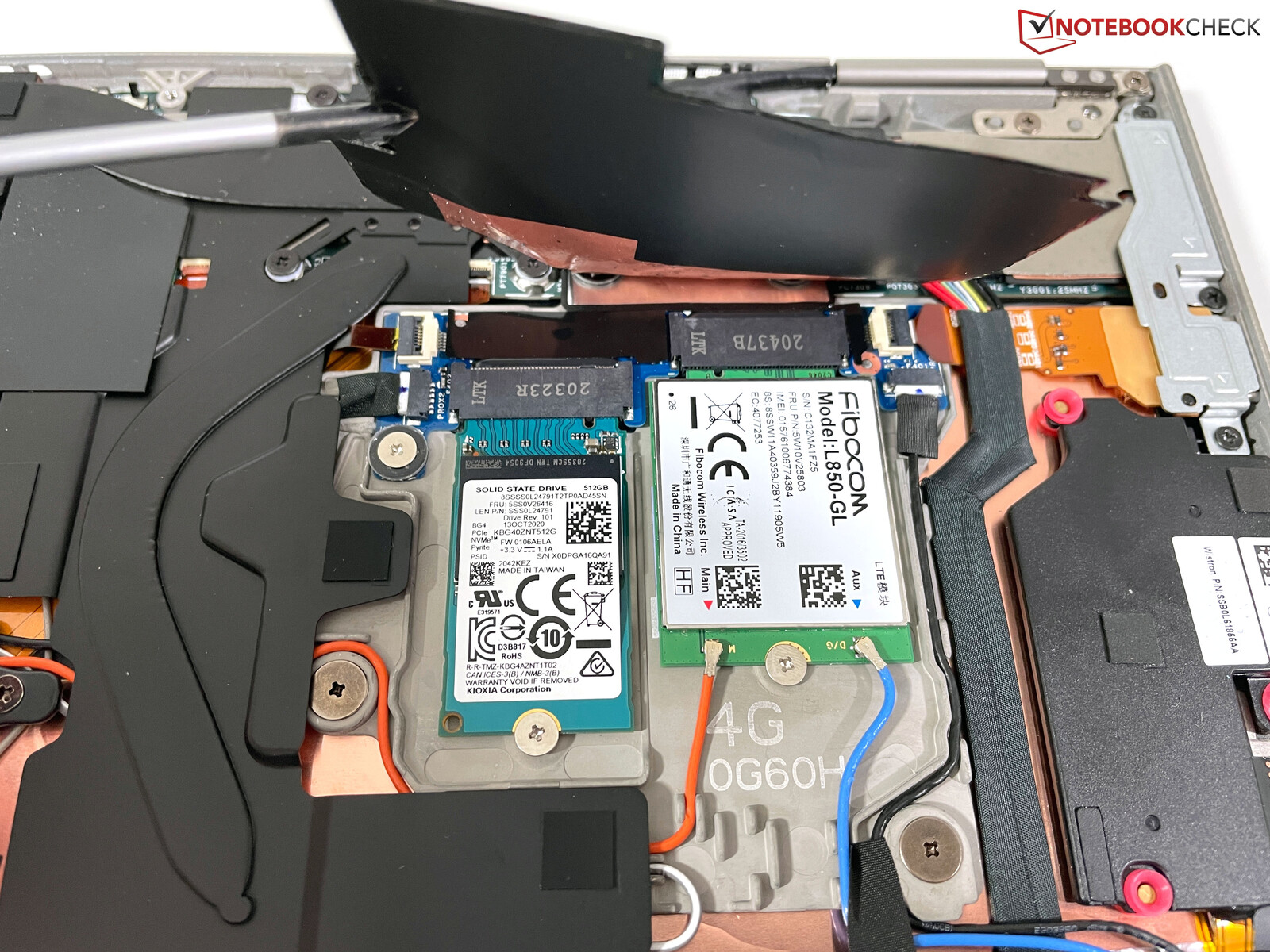
This photo from Notebookcheck's review shows exactly what it is: an M.2 2242 M-key NVMe (PCIe x4) SSD.
M.2 2242 isn't a popular form factor for SSDs, but M.2 2230 NVMe SSDs are picking up because the Steam Deck uses it. If you can find an adapter bracket, you can install such SSDs on the X1 Titanium Yoga.
That said, a quick look at Amazon shows some Samsung PM991 M.2 2242 NVMe SSDs.
Off-topic:
I'm on the opposite boat, actually, as I have a T480s and looking around for an M.2 2242 B-key (or B+M key) NVMe (PCIe x2) SSD to put on the WWAN slot. It's rare now that 2242 M-key SSDs have superseded it.
This photo from Notebookcheck's review shows exactly what it is: an M.2 2242 M-key NVMe (PCIe x4) SSD.
M.2 2242 isn't a popular form factor for SSDs, but M.2 2230 NVMe SSDs are picking up because the Steam Deck uses it. If you can find an adapter bracket, you can install such SSDs on the X1 Titanium Yoga.
That said, a quick look at Amazon shows some Samsung PM991 M.2 2242 NVMe SSDs.
Off-topic:
I'm on the opposite boat, actually, as I have a T480s and looking around for an M.2 2242 B-key (or B+M key) NVMe (PCIe x2) SSD to put on the WWAN slot. It's rare now that 2242 M-key SSDs have superseded it.
Planned Purchase: T480s i5-8350 FHD Touch
Impulse Buy: Thinkpad not named for safety reasons
RIP: X220 4291-C91 X61 7676-A24 760XD-U9E
Impulse Buy: Thinkpad not named for safety reasons
RIP: X220 4291-C91 X61 7676-A24 760XD-U9E
-
RealBlackStuff
- Admin Emeritus
- Posts: 24734
- Joined: Mon Sep 18, 2006 5:17 am
- Location: Loch Garman, Éire
Re: X1 Titanium SSD upgrade
@axur-delmeria:
For my T440p T480 I just ordered a WD SN500 in 2280 format, that you can cut shorter to 2242, as seen here.
For my T440p T480 I just ordered a WD SN500 in 2280 format, that you can cut shorter to 2242, as seen here.
Lovely day for a Guinness! (The Real Black Stuff)
But I actually prefer Murphy's from Cork!
But I actually prefer Murphy's from Cork!

Re: X1 Titanium SSD upgrade
For my Z13, which also only takes 2242 size NVMe drives, I purchased:
OWC Aura P13 M.2 2242 NVMe SSD (2.0 TB)
For $144.99 on their website.
It isn't the fastest in the world, (supposedly, I wouldn't know since it's plenty fast for me), but it has a 5 year warranty from OWC, who is the best in the business at customer support.
OWC Aura P13 M.2 2242 NVMe SSD (2.0 TB)
For $144.99 on their website.
It isn't the fastest in the world, (supposedly, I wouldn't know since it's plenty fast for me), but it has a 5 year warranty from OWC, who is the best in the business at customer support.
Last edited by unix_joe on Sun Jun 04, 2023 8:35 am, edited 1 time in total.
unix_joe
T14 Gen 1 and some older ThinkPads running Debian.
T14 Gen 1 and some older ThinkPads running Debian.
Re: X1 Titanium SSD upgrade
Also, one thing I learned in the hunt, is that 2242, 2280, etc. refer to the size of the drive in millimeters (22x42mm, etc) and that there are even smaller 2230 and 1630 size drives.
I never knew that before and thought I would share. All of my previous laptops took standard 2.5" drives or 2280 size so I was lagging behind whatever the industry has been putting in laptops for the past half decade.
I never knew that before and thought I would share. All of my previous laptops took standard 2.5" drives or 2280 size so I was lagging behind whatever the industry has been putting in laptops for the past half decade.
Last edited by unix_joe on Sun Jun 04, 2023 8:36 am, edited 1 time in total.
unix_joe
T14 Gen 1 and some older ThinkPads running Debian.
T14 Gen 1 and some older ThinkPads running Debian.
-
axur-delmeria
- Senior ThinkPadder
- Posts: 4417
- Joined: Mon May 28, 2012 5:49 am
- Location: Metro Manila, Philippines
Re: X1 Titanium SSD upgrade
Wait, the T440p's WWAN slot is M.2 SATA, not NVMe. Even the T470p has SATA signals on its WWAN slot:RealBlackStuff wrote: ↑Sat Jun 03, 2023 10:59 am@axur-delmeria:
For my T440p I just ordered a WD SN500 in 2280 format, that you can cut shorter to 2242, as seen here.
Excerpt from the T470p's FRU listing:
Code: Select all
00JT094     128G,M.2,2242,SATA6G,LTON,STD
00UP432     128G,M.2 2242 ,SATA6G,LION,STD
Code: Select all
04X4456     SSD 16GB SanDisk M.2 2242 U110-16
04Y2169     SSD 16GB 2242-D3-B -M LiteOn M.2 L6G-16 - Secondary
45N8465     SSD 16GB 2242-S3-B -M SanDisk M.2 U110-16 - Primary
Planned Purchase: T480s i5-8350 FHD Touch
Impulse Buy: Thinkpad not named for safety reasons
RIP: X220 4291-C91 X61 7676-A24 760XD-U9E
Impulse Buy: Thinkpad not named for safety reasons
RIP: X220 4291-C91 X61 7676-A24 760XD-U9E
Re: X1 Titanium SSD upgrade
B key SSD is SATA only. But some B key laptops such as the P71 provision SATA and PCIE 2x in the same B key slot.
B+M key SSD is a NVME PCIE 2x SSD which will fit in slots provisioned for both SATA and PCIE 2x, such as in the P71, or later NVME-only slots.
M key is NVME PCIE 4x and will only fit in slots provisioned for PCIE 4x.
All my research points to T440p being SATA only, so unfortunately the WD Blue SN500 as a PCIE 2x SSD won't work in the T440p.
B+M key SSD is a NVME PCIE 2x SSD which will fit in slots provisioned for both SATA and PCIE 2x, such as in the P71, or later NVME-only slots.
M key is NVME PCIE 4x and will only fit in slots provisioned for PCIE 4x.
All my research points to T440p being SATA only, so unfortunately the WD Blue SN500 as a PCIE 2x SSD won't work in the T440p.
sent from my iPhone
Registry Tweak To Enable 2 Finger Scroll On Old Synaptics Touchpads
Registry Tweak To Enable 2 Finger Scroll On Old Synaptics Touchpads
-
RealBlackStuff
- Admin Emeritus
- Posts: 24734
- Joined: Mon Sep 18, 2006 5:17 am
- Location: Loch Garman, Éire
Re: X1 Titanium SSD upgrade
Hold it!axur-delmeria wrote: ↑Sun Jun 04, 2023 12:04 amWait, the T440p's WWAN slot is M.2 SATA, not NVMe. Even the T470p has SATA signals on its WWAN slot:RealBlackStuff wrote: ↑Sat Jun 03, 2023 10:59 am@axur-delmeria:
For my T440p T480 I just ordered a WD SN500 in 2280 format, that you can cut shorter to 2242, as seen here.
Apologies.
I made a mistake in that post (and corrected it shortly after).
It was a WD SN500 for my T480 (and not T440p).
Lovely day for a Guinness! (The Real Black Stuff)
But I actually prefer Murphy's from Cork!
But I actually prefer Murphy's from Cork!


Re: X1 Titanium SSD upgrade
Careful when buying M.2 SSDs for ThinkPads: They only take single-sided drives.
IBM ThinkPad R50e | lenovo ThinkPad X301 | lenovo ThinkPad Z61t
Re: X1 Titanium SSD upgrade
I see the VisionTek DLX4 2242 M.2 PCIe 4.0 x4 SSD (NVMe) - 1TB on the Dell site. It's M-key but I can see a pic to see if it's single or 2-sided.
Re: X1 Titanium SSD upgrade
Have you gotten an SSD yet? I'm looking to upgrade mine as well, would be curious what worked (or didn't work) for you!
Re: X1 Titanium SSD upgrade
I ended up buying the ThinkPad 1TB PCIe NVMe M.2 2242 SSD Part #: 4XB1B85887 which is the Lenovo recommended part. It's ~ $250 but I waited until it was on sale for ~$200. Installation was simple.....loosen the captive screws, use a tool to open the back cover and replace the drive. Remember to disconnect the internal battery via the BIOS settings. I had downloaded the initial install file on a USB, but I took the lazy route and used Acronis to clone the drive. Very straightforward.
Re: X1 Titanium SSD upgrade
Thanks!
-
- Similar Topics
- Replies
- Views
- Last post
-
-
Upgrade SSD & RAM on New ThinkPad While Keeping Warranty – Who Tried It?
by marcusfrank » Wed Nov 26, 2025 8:24 pm » in Thinkpad - General HARDWARE/SOFTWARE questions - 3 Replies
- 14601 Views
-
Last post by dr_st
Fri Nov 28, 2025 4:18 am
-
-
-
P15 gen1 ... will a 1TB + 4TB NVMe SSD pairing work?
by portsample » Thu Nov 27, 2025 8:23 pm » in ThinkPad P1/P14/P15/P16/P40/P50/P70 and later Series - 2 Replies
- 8277 Views
-
Last post by portsample
Thu Nov 27, 2025 10:00 pm
-
-
-
FS: Transcend MTS400 512GB M.2 SSD
by PiZzA EnGiNeEr » Mon Dec 29, 2025 2:14 pm » in Marketplace - Forum Members only - 0 Replies
- 3163 Views
-
Last post by PiZzA EnGiNeEr
Mon Dec 29, 2025 2:14 pm
-
-
-
M.2 SSD in P14s Gen 3 (Intel) (21AK)'s WWAN slot
by usescomputers » Sat Jan 24, 2026 5:57 am » in ThinkPad P1/P14/P15/P16/P40/P50/P70 and later Series - 0 Replies
- 5453 Views
-
Last post by usescomputers
Sat Jan 24, 2026 5:57 am
-
Who is online
Users browsing this forum: No registered users and 21 guests